

Good HVAC website design comes down to one job, making the phone ring. When I built a site for an air conditioning and heating company, that was the entire brief, turning searches into phone calls. Every choice on the project, from the header layout to the call tracking, served that single goal.
This guide works backward from that phone call. I’ll walk through the header, the core pages, the quote form, the tracking and the speed work a heating, cooling or plumbing company needs, along with a few legal rules around licensing, financing and reviews that trip up plenty of contractor sites. Use it as your checklist before hiring a developer or rebuilding what you have.
Start with the person holding the phone. Most people landing on a contractor site are on a phone, often standing in a sweltering bedroom or a flooded basement. They aren’t casually browsing. They need three answers right away. Do you handle this job, do you cover my area, and how do I reach you? Everything below is built around answering those three questions fast.
What good HVAC website design puts in the header
Your header is the one part of the site every visitor sees, so it has to carry the most weight. On a phone, these four things should appear without scrolling:
- A tap to call phone number built as a real
tel:link rather than an image of a number, sized large enough for a thumb. - One clear main button, like Get a quote or Book service. Pick one label and stick with it across the site.
- A short service area line, such as Serving Travis County and nearby towns, so visitors know within two seconds if they’re in the right place.
- Emergency hours, though only if they’re real. Anyone who calls at 11 pm and hits voicemail won’t trust the rest of your site.
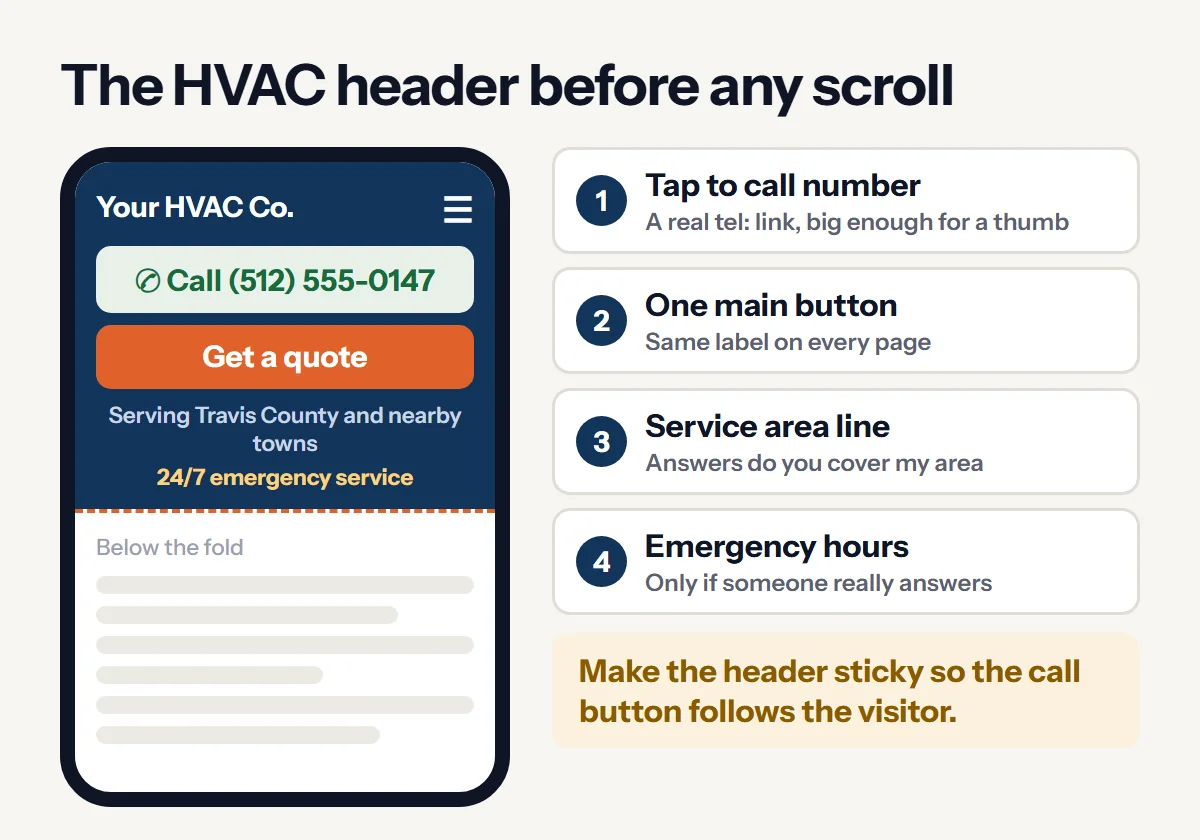
Keep the header sticky on mobile so the call button stays within reach as visitors scroll down. Keep the menu tight with Services, Service Areas, Financing, Reviews, About and Contact, and tuck everything else into the footer.
Format your phone link with the country code, like tel:+15125550147, so it dials properly from any phone. Before launch, tap it yourself on both an iPhone and an Android phone.
The pages that bring calls
For that HVAC project, I built the home page plus twenty inner pages in WordPress with Elementor. The plan covered services, service areas, financing and contact, pairing click to call in the header with a quote form on every page. That setup gives most heating, cooling and plumbing companies a solid starting point.
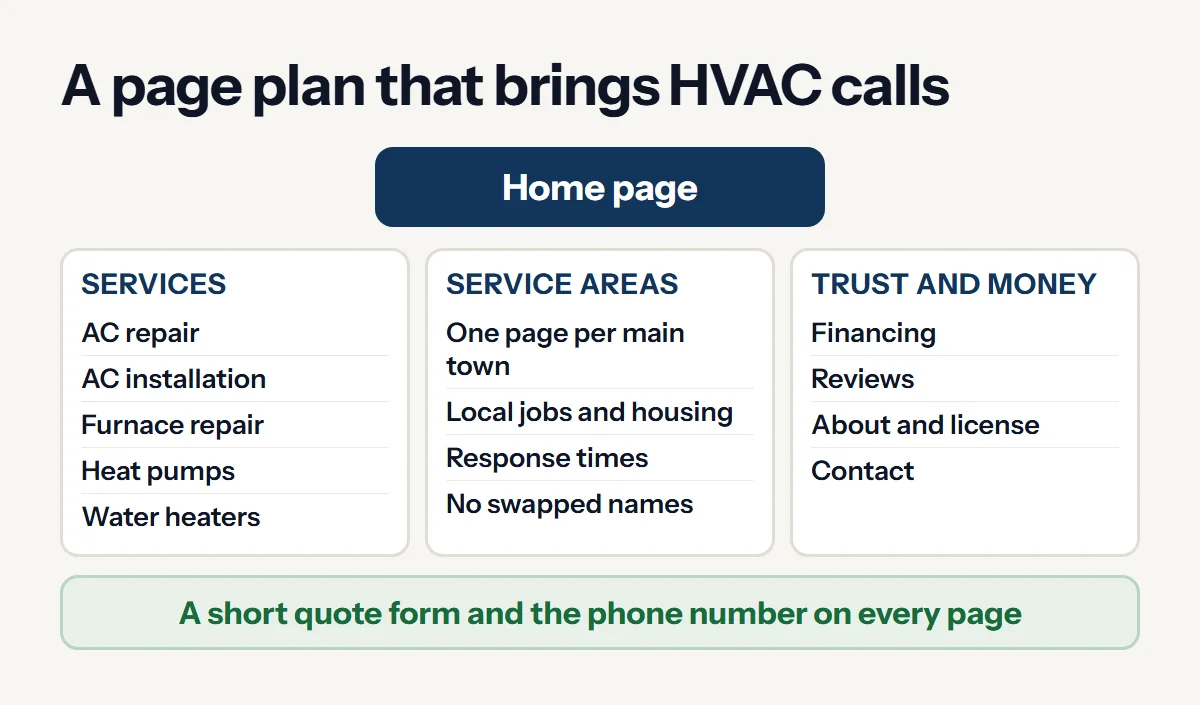
One page per service
Don’t lump AC repair, furnace installation and water heater replacement onto one generic Services page. Each job is a separate search and deserves its own page. A strong service page covers six things, in this order:
- What the job actually is, explained in plain language.
- Signs the homeowner needs it, like strange noises, uneven temperatures or rising utility bills.
- What happens during the visit, step by step.
- The brands you work on and the warranties you honor, provided you can back them up.
- A short FAQ with the real questions your dispatchers hear every week.
- Your quote form and phone number, repeated at the bottom.
That FAQ is where a local site can beat the big national directories. Questions like why is my AC running but not cooling or should I repair or replace a 15 year old furnace match what homeowners type into Google, and your office already answers them every week.
Service area pages
If your trucks cover several towns, a page for each main area helps you show up for local searches like AC repair in Round Rock. Those pages have to be genuinely different from each other. Google’s spam policies call out doorway abuse, and one of their own examples is a set of city or region pages that funnel visitors to one destination.
Write about the jobs you actually handle in that town, the age and style of local homes, your realistic response times and anything specific to the area. If a page still reads fine after you swap one town name for another, it’s too thin. My guide on service area pages for contractors shows where that local detail comes from.
Never make up an office address just to look local. If customers don’t come to your address, Google’s Business Profile guidelines say a service area business should hide it, and your website should match that setup.
Financing
Replacing a whole system is a major expense, and plenty of homeowners won’t call until they know they can spread the cost. Your financing page should name your lender, explain how to apply and link straight to the application. Stick to the wording your lender provides for rates and terms instead of writing your own.
There’s a legal reason behind this. Under the federal Truth in Lending rules, a monthly payment amount, the number of payments or a down payment figure in an ad is a triggering term. Once a page includes one, Regulation Z section 1026.24 requires the down payment, the full repayment terms and the annual percentage rate to appear as well. A simple line like Low monthly payments, apply today is much safer than a made up price per month.
While you’re on that page, check any old tax credit or rebate lines. The federal Energy Efficient Home Improvement Credit, which paid up to $2,000 a year for a qualifying heat pump, only covers improvements made through December 31, 2025. Leaving that promise up for someone installing a system now puts wrong tax information under your business name.
Reviews, about and licensing
Show your real customer reviews and link to your Google Business Profile so visitors can check them. Since October 21, 2024, the FTC’s rule on consumer reviews and testimonials bans fake reviews, paying for reviews that must be positive and suppressing bad ones through threats. Quote reviews word for word and never write your own.
Let go of expecting gold stars in Google search for reviews hosted on your own site. Google stopped showing those self-serving review rich results for local businesses back in 2019. On-site reviews still build trust with visitors, while the stars shown in Google Maps and local results come from your Business Profile.
Show your license number clearly, usually in the footer and on the About page. In some states, this isn’t optional. California’s contractor board treats any website that solicits business as advertising and requires the license number on all of it, with a civil penalty of $100 to $1,000 for a first offense, according to its advertising guidelines. In Texas, 16 TAC section 75.71 requires air conditioning and refrigeration contractors to include the affiliated licensee’s number in their advertising.
Round out your About page with your insurance details, the EPA Section 608 certification your technicians hold for refrigerant work, and real photos of your crew and vans. Stock photos of smiling technicians in spotless uniforms do little for trust, because homeowners can tell.
A quote form on every page, kept short
Visitors shouldn’t have to hunt for the form. Put a short version near the bottom of every service and area page, and save the fuller one for your Contact page.
Keep the short form to these fields:
- Name and phone number.
- ZIP code, so your office can confirm right away that the job is in range.
- The service needed, as a simple dropdown.
- A preferred callback time.
- An optional message box.
Every extra required field costs you leads. Keep email optional, since most homeowners want a quick call rather than an email thread.
Send every submission to your office inbox and, if you use a CRM, straight into it with an instant text alert to whoever runs dispatch. A lead left sitting until the next morning often books with whichever company picked up first. The same urgency applies when your technicians miss calls in the field, which is where missed call text back earns its place.
Block spam quietly instead of forcing real customers through frustrating puzzles. A honeypot field costs nothing, and Cloudflare Turnstile has a free plan with unlimited challenges that works even if the rest of your site doesn’t use Cloudflare.
Once the site goes live, submit the form on every page template yourself. Forms break quietly, and nobody notices until the phone goes quiet.
Tracking which pages bring calls
If you’re paying for ads or SEO, you need to know which pages and campaigns actually produce calls and quote requests. My setup for contractors combines Google Tag Manager, GA4 key events (the name GA4 now uses for what it used to call conversions) for phone taps and form submissions, Google Ads conversions if you run ads, and the Meta Pixel if you advertise on Facebook or Instagram.
The part that matters is that everything is tested. On that HVAC build, I proved each event fired, from page view to contact to lead, in GA4 DebugView and Tag Assistant before handover. That gave the owner clear proof of which pages brought the calls. Untested tracking is worse than none, because it pushes you to spend money based on wrong numbers. My conversion tracking setup page explains how I test it end to end.
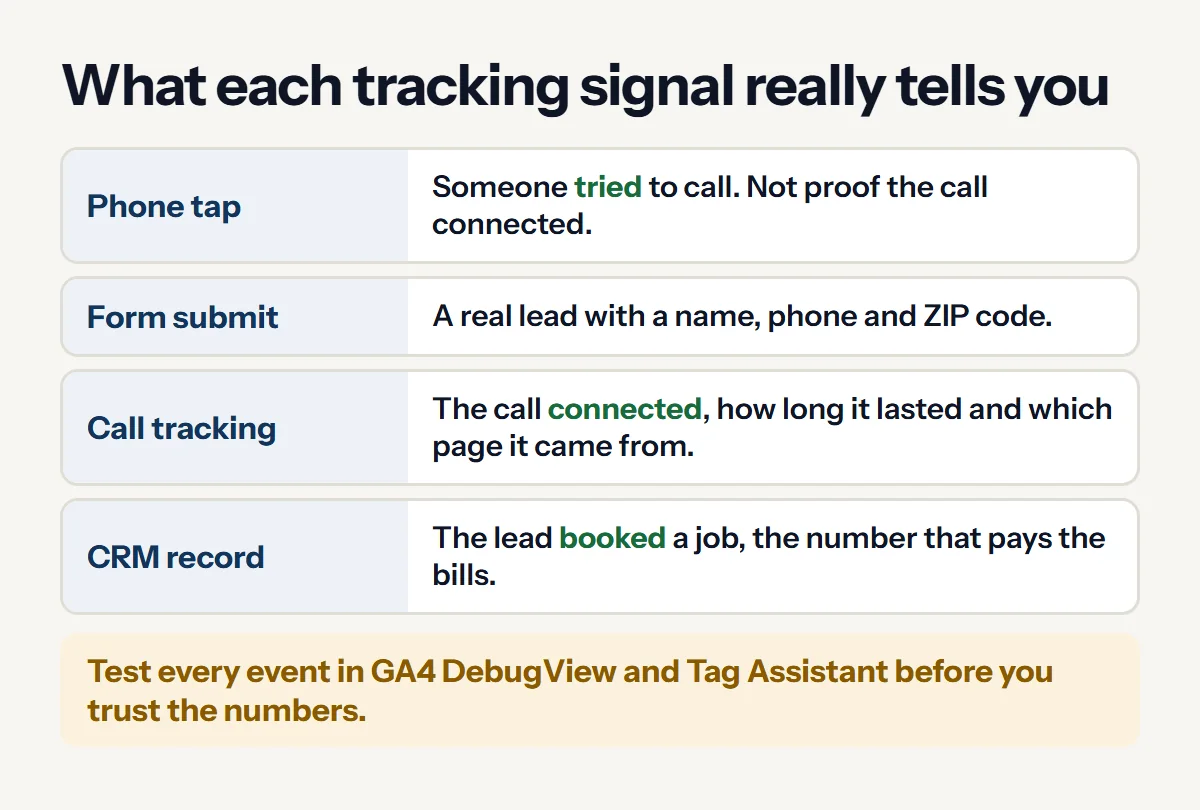
Be clear on what each signal measures. A tap on a phone link proves someone tried to call you, not that the call connected or turned into a booked job. If you need call outcomes, add a call tracking service that swaps the number for website visitors and records which page they came from.
Keep your main business number the same in your Google Business Profile, your site footer and your directory listings. Google’s guidelines ask for a local number under the direct control of the business, and matching details everywhere help customers and search engines trust that they’ve found the right company.
Speed and mobile basics contractors skip
A slow website loses the impatient homeowner with a dead furnace. Google’s Core Web Vitals set clear targets, a Largest Contentful Paint of 2.5 seconds or less, an Interaction to Next Paint of 200 milliseconds or less and a Cumulative Layout Shift of 0.1 or less, measured at the 75th percentile of real visits.
On most contractor sites, hitting those numbers comes down to four habits:
- Compress the hero image and serve it as WebP at the size it actually displays.
- Drop autoplay video backgrounds and heavy sliders from the home page.
- Load chat widgets and review carousels after the main content.
- Test on a real mid-range phone over mobile data, not only on fast office Wi-Fi.
If a heavy hero image is the slow part, my guide on how to fix Largest Contentful Paint in WordPress walks through the fixes in order.
At a glance
Before you sign off on a new or rebuilt HVAC site, run through these eight checks:
- Tap to call number and one main button visible on mobile without scrolling.
- One page per service, each with its own FAQ and quote form.
- Service area pages with real local detail, not swapped town names.
- A financing page in your lender’s own wording, with no stray monthly payment figures.
- No promises about expired federal tax credits.
- Real customer reviews, your license number and real photos of your team.
- Forms tested on every page template, with leads alerting the right person.
- Phone taps and form submissions tracked and proven in GA4.
For everything I include in contractor builds, see my page on HVAC, roofing and plumbing websites.
You might also find these useful, my roofing contractor website guide, what to build first in a GoHighLevel setup for local businesses and conversion tracking you can trust.
Questions about HVAC websites
How many pages does an HVAC website need?
Enough to give each main service and each main town its own page, plus your home, financing, reviews, about and contact pages. A company handling heating, cooling and plumbing across six towns needs a much bigger site than one doing AC repair in a single town.
Should I put prices on my HVAC website?
Show prices where they’re fixed, like a maintenance plan or a diagnostic fee. For installs, explain what moves the price, such as system size, ductwork condition and access, then invite a free estimate.
Do I need a separate website for plumbing?
Usually not. One site with separate service pages for heating, cooling and plumbing builds authority in one place and keeps all your reviews together. A separate site only makes sense if plumbing runs as a different business with its own name and license.
Can I edit the site myself after launch?
You should be able to. I build contractor sites in WordPress with Elementor and hand over a short guide, so you can change hours, add a service town or swap team photos without calling a developer.
Request a free website review and I’ll tell you which of these fixes would bring the most calls first.